
Success Stories
26. August 2026
Trade and logistics Jira integration: Connecting Outlook and Microsoft Teams

A trade and logistics Jira integration connects structured Jira work with requests, ideas, and decisions that begin in Outlook or Microsoft Teams. At Atlassian Team Europe in Barcelona, Jan Graeber, IT Business Partner at Peter Cremer Holding GmbH & Co. KG, explained how his organization uses Microsoft 365 for Jira across IT service management, product management, and development.
The customer challenge: Fragmented communication channels
Cremer operates internationally across industry, trade, and logistics. Business and technical teams use Jira to manage work, but relevant information frequently arrives through email or Teams.
Turning these messages into Jira work required someone to rewrite the content, select the correct project and work type, and provide enough context for the receiving team. For Jan, who works between business and technical teams, this was a frequent source of manual effort.
The trade and logistics Jira integration workflow: Turning conversations into work
With Microsoft 365 for Jira, Jan can create a Jira work item directly from an Outlook email. The content is transferred into a Jira creation dialog, where he can review the draft, select the project and work type, complete required fields, and control what is shared.
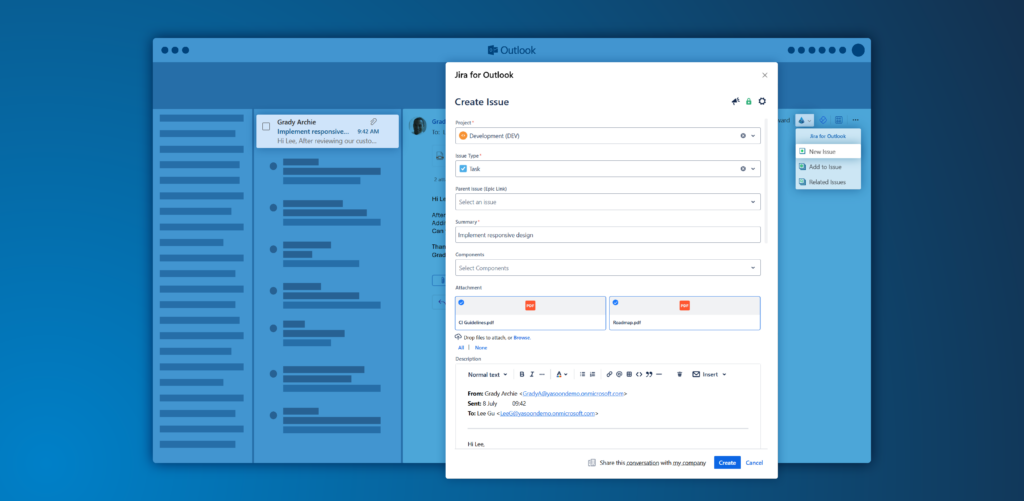
This supports internal service requests as well as product and development work. An email containing an idea, requirement, or decision can become the starting point for a Jira story.
Microsoft Teams conversations can also create new work items or be linked to existing Jira work. Jira remains the structured record, while business users continue communicating through Microsoft 365.
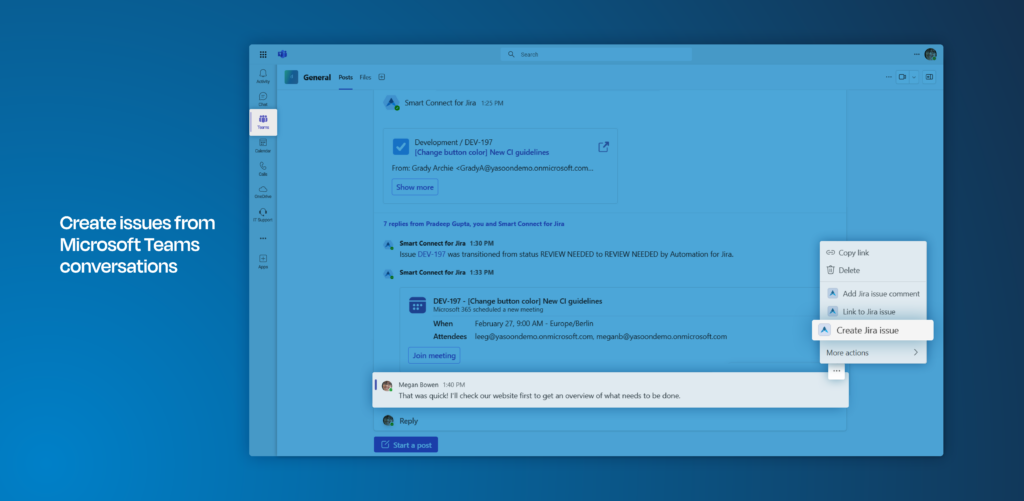
The Teams integration allows users to create new Jira work items directly from Microsoft Teams chats and channel conversations. This makes it easy to bring important discussions to Jira for further action.
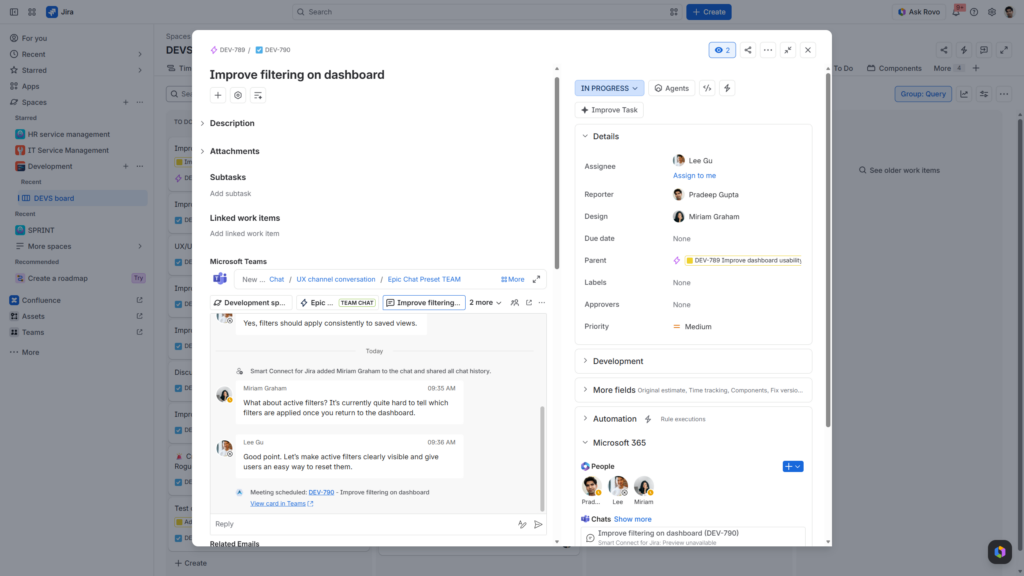
The Teams conversation remains accessible directly from the Jira work item. Users can read and reply to messages in Jira and view participants’ Teams availability in the sidebar, keeping ongoing collaboration connected to the work item.
The reported outcomes
Jan estimated that linking work items with Microsoft 365 communication saves approximately 5 to 10 minutes per item. Applied to a reported annual volume of around 5,000 tickets, this equals a calculated potential saving of approximately 400 to 800+ hours. This range is based on Jan’s estimate, not a formal time study. Actual results depend on ticket volume and the previous amount of manual work.
The workflow also helps teams create work sooner, retain the original communication context, and prevent ideas or decisions from remaining in individual inboxes.
Special insight: Connected context supports AI
Connecting relevant emails, Teams discussions, decisions, and Jira data creates a stronger foundation for AI-assisted work. Authorized AI workflows can potentially use this collaboration context for more useful summaries, descriptions, classifications, or suggested next steps.
This was not an AI outcome measured by Cremer. AI results still depend on permissions, data quality, configuration, and after all: human review.
What Jira administrators can take from this
Jira administrators should begin by mapping where requests and ideas originate. Select one repetitive workflow, define the required Jira fields, and decide which Outlook or Teams content may be shared.
Implementation requires coordination with Microsoft administrators. A pilot workflow can validate permissions, configuration, and user guidance before a wider rollout. Measuring handling time before and after implementation also provides a more reliable assessment of value.
Trade and logistics Jira integration with Microsoft 365 for Jira
Jan’s example shows how a Jira and Microsoft 365 integration can turn incoming emails and Teams conversations into structured, actionable work. By connecting familiar communication channels with Jira, business users can continue working in Outlook and Microsoft Teams while technical teams receive better-contextualized work items. A focused rollout, clear sharing rules, and coordination between Jira and Microsoft administrators help make this workflow sustainable.