
Success Stories
22. September 2026
Teams Jira integration for research institutions: How IIT connects service teams

At Atlassian Team Europe in Barcelona, Nicolas Dring shared how Istituto Italiano di Tecnologia (IIT) combines Jira Service Management with Microsoft Teams through Microsoft 365 for Jira. IIT is a scientific research institution with more than 2,000 employees and research centers across Italy. Its teams use Jira to bring requests from different departments into one structured workflow. A Teams Jira integration for research institutions can help multidisciplinary teams coordinate service requests without losing important information across email, private chats, and disconnected systems.
The challenge: Coordinating services across departments
Scientific projects at IIT often require support outside the laboratory. Researchers may need a project website, printed conference materials, photos or videos of robotics work, or resources for a public event. Nicolas explained that employees submit these requests through Jira Service Management in categories such as:
- Websites and web applications.
- Printed documents, such as business cards.
- Photography and video production.
- Materials and support for public events.
These services often overlap. A robotics project, for example, might require laboratory photography, an edited video, a web page, and materials for an event.
Requests through email made it difficult to coordinate tickets involving several departments. Updates, files, and decisions often remained in individual inboxes. Colleagues taking over or joining the work could not easily see what had already been discussed. Private Microsoft Teams chats caused the same problem when the conversation was not connected to the relevant Jira request.
The workflow: Connecting Microsoft Teams conversations to Jira
Nicolas’ teams configured Jira Service Management around the services IIT employees actually request. The portal is divided into areas for web, digital printing, multimedia, and outreach. Employees select the relevant area and submit their requirements as a Jira request. The responsible agents can then assign the work, track its status, and involve other departments when a request spans several services.
When clarification is needed, agents can start a Microsoft Teams chat directly from the Jira work item using Microsoft 365 for Jira. The linked conversation remains accessible from the request, allowing authorized team members to review what has already been discussed. This gives agents the speed of Teams while keeping the request, its status, and the related communication together in Jira.
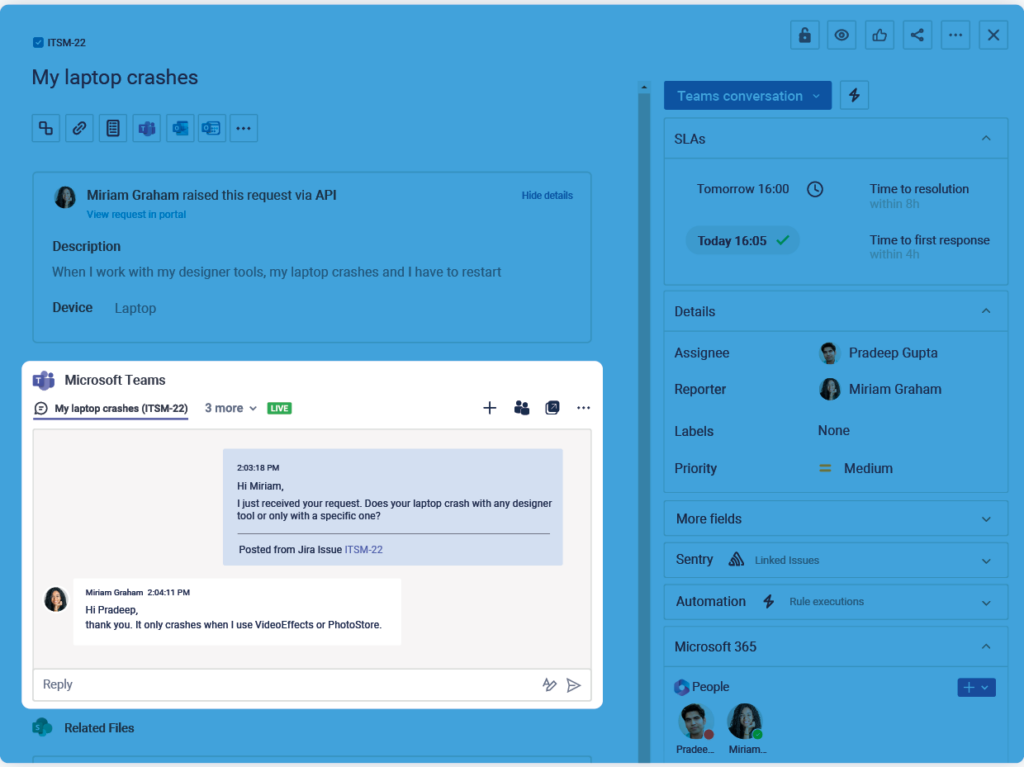
The two systems have distinct roles:
- Jira Service Management provides the request, ownership, status, and workflow.
- Microsoft Teams supports direct conversation between the people involved.
- The integration keeps communication accessible from the relevant Jira work item.
This is especially useful when several departments contribute to the same request. Agents can review its status and previous communication without asking colleagues to forward emails or summarize private conversations.
The outcomes Nicolas observed
Nicolas emphasized transparency as the main benefit. Requesters can follow the status of their work, while service teams share a clear view of its context, ownership, and progress. This reduces reliance on disconnected email threads and private Teams chats, makes cross-department collaboration easier, and limits the time agents spend searching for information or reconstructing previous discussions.
These improvements come from IIT’s combined use of Jira, Microsoft Teams, organizational data integrations, and automation rather than from a single feature. Together, they reduce repetitive communication and give agents more time to complete requests. Based on his practical experience, Nicolas estimated that the setup saves IIT’s team of approximately 15 agents several days of work each year. This was an operational estimate, not the result of a formal time study.
What Jira administrators can learn from IIT
Research institutions should start by mapping their internal services and identifying where requests move between departments. This helps administrators decide which conversations should remain connected to Jira. Who needs to participate, and who should be able to view the information.
The teams responsible for internal technology systems, including Microsoft 365 and information security, should be involved early. They decide which apps can be installed, what data they may access, and which permissions users receive. Nicolas’ experience also supports a phased rollout. Begin with the approved Jira and Teams workflow, then add Outlook or meeting features after the responsible technical teams have reviewed and approved them.
A more transparent service workflow for research institutions
Nicolas’ story demonstrates how the Teams Jira integration in Microsoft 365 for Jira can support the operational work behind scientific research. Jira provides structure, Teams enables direct communication, and the connection helps departments work with shared context.
Thank you to Nicolas for openly sharing his experience, practical insights, and ideas for improving the workflow further. His use case gives other Jira administrators a useful starting point for considering where linked Teams conversations and automation could improve their own service processes.